AI-Powered Client Onboarding: How to Build a Zero-Touch Intake System in Under an Hour
For most owner-operated small businesses, winning a new client is a moment of celebration—immediately followed by a mountain of admin work. You have to send the contract, collect onboarding questionnaires, set up folders, schedule kickoff calls, and manually copy client data from one platform to another. When you are running a lean operation, this process can eat up hours of your week and delay the actual start of work.
What you will learn in this guide:
- Why traditional rigid automations break, and how AI adds a smart layer of quality control.
- The step-by-step blueprint to connect your intake forms to your CRM and file storage.
- How to configure AI structured outputs to automatically clean, organize, and format client data.
- How a zero-touch kickoff flow delights new clients while buying back hours of your administrative time.
But it does not have to be this way. By using simple, connected AI agents, you can build a 100% automated, zero-touch client onboarding system that runs in the background. In under an hour, you can connect your lead capture tools to a smart intake agent that handles the paperwork, formats the data, and kicks off the project while you focus on delivery.
In this guide, we will break down exactly how to build this automated pipeline step-by-step using tools like Make.com, ChatGPT (or Claude), and your existing CRM. If you have already read our AI agents for small business guide, you know we believe in practical, high-impact workflows. Let’s get into the mechanics of automating your customer intake.
Why Traditional Automation Falls Short (And How AI Fixes It)
Many business owners try to solve this problem with standard automation tools. They set up a basic Zapier flow that triggers when a form is submitted. But traditional automation is rigid: if a client types “N/A” in a mandatory phone number field, or formats their company name in a weird way, the automation breaks or pollutes your CRM.
This is where AI-driven onboarding changes the game. Instead of relying on strict field matching, you can route the intake data through an AI agent. The agent reads the raw inputs, standardizes the text, flags missing or suspicious information, and even draft-emails the client for clarification if needed. This “intelligent layer” ensures your customer records remain pristine without requiring your manual oversight.
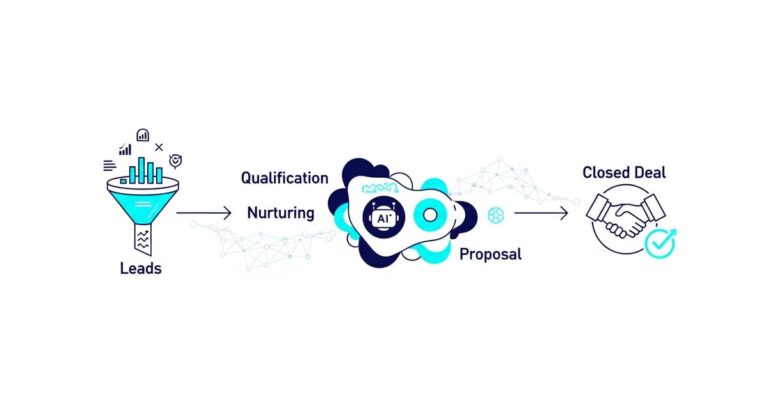
By connecting this intake intelligence to your initial marketing, you create an end-to-end hands-free system. For example, once your AI follow-up automation nurtures a lead and secures the sale, the intake agent takes over the handoff seamlessly. It bridges the gap between sales and operations automatically.
The 4-Step Zero-Touch Onboarding Blueprint
Building this system requires four distinct stages that connect your client-facing forms to your internal project management tools. Here is how to configure the entire workflow in under an hour:
Step 1: Capture the Raw Intake Data
Start with a simple form builder like Typeform, Fillout, or Tally. Ask the client for their contact details, project scope, goals, and any brand assets. Avoid asking for too much at once—keep it focused on what you absolutely need to start the project.
Step 2: Format and Clean with AI Structured Outputs
Once the form is submitted, route the payload to your automation platform (like Make.com). Instead of sending it straight to your CRM, pass the text to OpenAI’s API using Structured Outputs. This feature forces the AI model to return data in a strict JSON format that you define. You can read more about how this works on the OpenAI Structured Outputs Developer Guide. The AI will clean up capitalization, extract clean phone numbers, and separate the project goals into structured bullets.
Step 3: Distribute to Your Stack
Now that the data is clean and structured, use a router in Make.com (see the Make.com Router Guide for details) to send it to three places simultaneously:
- Your CRM: Create or update the contact record and mark them as “Active Client.”
- Your Project Management Tool (e.g., ClickUp, Asana): Create a new project folder with pre-configured task lists.
- Your Cloud Storage: Create a dedicated Google Drive or Dropbox folder for the client’s assets.
Step 4: The Automated Kickoff & Scheduling
The final step is sending the kickoff email. The AI agent can draft a highly personalized email template that mentions specific points from their intake questionnaire, showing the client that you have already reviewed their answers. Include a dynamic scheduling link (like Calendly) so they can book their kickoff call immediately.
How This Fits into Your Bigger AI Ecosystem
Automating onboarding is just one piece of the puzzle. When you connect multiple agents together, your business gains a massive operational advantage. This is exactly how SquidBot uses connected AI agents to run marketing, sales, and delivery tasks in tandem. When your client onboarding, service delivery, and customer communications all talk to each other, you can run a multi-million dollar agency with a tiny, hyper-efficient team.
Once onboarding is complete and you begin delivering excellent service, you can leverage the same clean CRM data to automatically generate reviews. Integrating this onboarding system with your automate customer review requests with AI pipeline ensures that you are gathering valuable client feedback the moment they experience their first win.
Sources
- OpenAI Developer Documentation: OpenAI Structured Outputs Guide
- Make.com Help Center: Make.com Routing and Automation Documentation
Frequently Asked Questions
Can I automate contracts and digital signatures with AI onboarding?
Yes. You can integrate tools like DocuSign, PandaDoc, or SignWell directly into your automation builder. When a new deal is won in your CRM, the system can automatically populate a contract template with the client’s details and email it to them before triggering the intake form.
How do I handle clients who do not fill out the onboarding form?
You can set up a simple reminder agent. If the onboarding form remains empty 48 hours after the contract is signed, the system can automatically send a polite reminder email. If they still haven’t filled it out after 5 days, it can notify your team to reach out personally.
What if a client uploads the wrong files or incorrect links?
The AI formatting layer is perfect for this. When the intake data passes through the AI, you can instruct the model to validate that the URLs are correct and look like valid web addresses or asset folders. If the validation fails, the system can pause and draft a notification email asking the client to double-check their upload.
Get Started with Automated Onboarding Today
Setting up an automated client onboarding system is one of the fastest ways to buy back your time and give your new clients a premium, professional experience from day one. You don’t need complex code or expensive enterprise software—just a few simple tools connected intelligently.
At SquidCircle, we specialize in helping owner-operated businesses build custom, resilient AI workflows that handle the heavy lifting of admin, marketing, and operations. If you are ready to transform your onboarding and scale your business without the overhead, let’s build it together.